
Motivation#
In the previous post, I deployed a web version of Obsidian using linuxserver/obsidian. It solved the problem of taking notes on machines where installing desktop software is restricted, but after using it for a while, it never felt clean.
The reason is simple: it wraps the full desktop Obsidian Electron app inside a virtual desktop environment and streams the screen to the browser through KasmVNC. Running a full desktop environment just to edit Markdown notes feels unnecessarily heavy. In practice, the interface also carries remote-desktop toolbars, indirect clipboard pasting through the KasmVNC side panel, extra workarounds for Chinese fonts, and an awkward experience on mobile browsers.
Looking at newer self-hosted projects, there are now ways to run Obsidian directly in the browser without streaming a virtual desktop. After comparing the available options, I retired the old KasmVNC container and deployed Ignis instead, keeping the same Nextcloud vault sync workflow.
Other articles in this series:
- Obsidian (1): All-platform Notes Management Software
- Obsidian (2): Deployment and Use of Web-based Obsidian
Comparing Browser-Based Options#
Current ways to access Obsidian in a browser fall into three broad categories:
- Remote desktop streaming (such as
linuxserver/obsidianwith KasmVNC or Selkies): runs the full Linux desktop app inside a container and streams video to the browser. It supports every desktop feature, including plugins that depend on local binaries or native Node modules, at the cost of higher resource usage and clunky clipboard, input method, and mobile behavior. - Browser compatibility shims (such as Ignis and Markport): leaves Obsidian itself unmodified and shims the Electron and Node.js APIs it expects so the actual Obsidian frontend executes directly inside a standard browser while vaults stay as plain files on the server.
- Clean-room Markdown web clones (such as WebObsidian): independent web apps built from scratch with components like CodeMirror that read and write standard Markdown and
.obsidianfolders. They avoid downloading Obsidian’s proprietary bundle and often include built-in auth and APIs, but they do not run Obsidian’s real plugin runtime.
Here is a brief comparison of the main candidates I evaluated:
| Option | Approach | Runs Real Obsidian? | Community Plugins | Deployment & Sync Notes |
|---|---|---|---|---|
linuxserver/obsidian | Full Linux desktop + screen streaming | Yes | Full | Heavier on CPU/RAM; indirect clipboard, CJK font setup, poor mobile UX |
Nystik-gh/ignis | Electron/Node shim + server backend | Yes (tracks 1.13+ / 1.14) | Most API-based plugins work | Native browser rendering, lightweight, no built-in auth (fits Traefik + Authelia well) |
MusiCode1/markport (formerly obsidian-web) | Renderer shim (client-first) | Yes, capped at 1.12.7 | Older versions only | Intentionally does not satisfy Obsidian 1.13’s startup check; geared more toward client-only browser use |
xnohat/webobsidian | Independent web app clone | No | Limited; no real Obsidian plugin runtime | Built-in single-user password and Git sync; search/graph indices stay in memory |
Since all my devices already sync with Nextcloud via the Remotely Save community plugin, running real Obsidian with plugin support was the deciding factor. Ignis is the best fit: it avoids remote desktop wrapping, tracks recent Obsidian releases, uses far fewer resources, and leaves authentication to my existing reverse proxy and Authelia setup without introducing a second login layer.
Prerequisites#
- Docker and Docker Compose
- A reverse proxy with HTTPS, WebSocket support, and authentication (such as Traefik with Authelia, or Caddy/Nginx with Basic Auth)
- An existing Nextcloud instance for cross-device syncing
For setting up Nextcloud, reverse proxies, and authentication, see my earlier posts:
- Using Nextcloud and Docker to Build a Personal Cloud Storage
- Access Personal Website from Internet (2) - Traefik Reverse Proxy Configuration
- Access Personal Website from Internet (3): Using Cloudflare Tunnel for Reverse Proxy
- Authentication: Deploying Authelia for Private Identity Service
Deploying Ignis#
Ignis Overview#
The Ignis Docker image does not bundle proprietary Obsidian code. On its first start, the entrypoint downloads the pinned official Obsidian release and unpacks it into /app/obsidian-app. The Node.js server then handles filesystem operations, WebSocket updates across tabs, and proxied network requests for plugins.
Because the UI renders directly in the browser, text rendering, CJK display and input methods, native copy/paste, and responsive mobile layout all work naturally, while your notes remain ordinary Markdown files in a host directory.
One important caveat: Ignis has no built-in authentication, and modern browsers disable required APIs (such as clipboard and crypto features) outside HTTPS. Never expose it directly over plain HTTP; always place it behind HTTPS and an authentication layer.
Docker Compose Configuration#
Create a working directory and host data directories. Check your local UID and GID with id first so container file permissions match your user:
| |
Create docker-compose.yml and .env inside the directory. Pinning an explicit release tag rather than latest keeps upgrades predictable:
- docker-compose.yml
| |
- .env
| |
Key settings explained:
VAULTS_DIRandDATA_DIR: bind-mounted to/vaults(your vaults) and/app/data(Ignis server settings).obsidian-app: a named Docker volume that caches the downloaded Obsidian frontend assets so container recreations do not re-download them.PUID/PGID: set to your host user’s UID and GID (note that on some Linux distributions the default user group GID is100rather than1000).WS_ORIGINS: restricts accepted WebSocketOriginheaders to your public HTTPS URL to protect against cross-site WebSocket hijacking.healthcheck: checks/api/version; givingstart_period: 120sprevents false unhealthy reports while the first startup fetches Obsidian.
Starting and Reverse Proxy Configuration#
Validate and start the stack:
| |
The first boot takes a minute or two while Ignis downloads and unpacks Obsidian. Once the logs report the server listening on port 8080, verify the local API endpoint:
| |
A healthy instance responds with JSON similar to:
| |
Next, route your domain to http://ignis:8080 behind authentication. With Traefik and Authelia, a dynamic route looks like this:
| |
If you publish the service through Cloudflare Tunnel, add the matching hostname to your tunnel’s ingress rules and point its Cloudflare DNS record to that tunnel. Traefik handles WebSocket upgrades automatically.
Initial Setup and Nextcloud Sync#
Creating the Vault#
Open your domain in the browser and sign in through Authelia. On first launch, Ignis opens its Vault Manager:
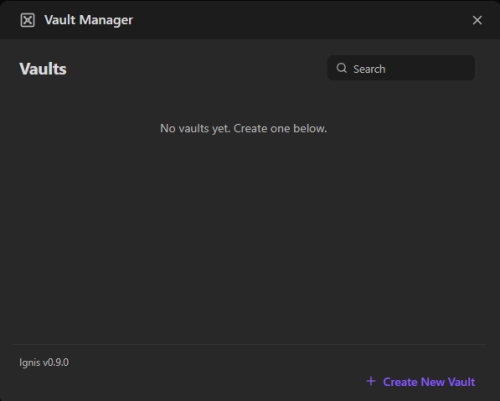
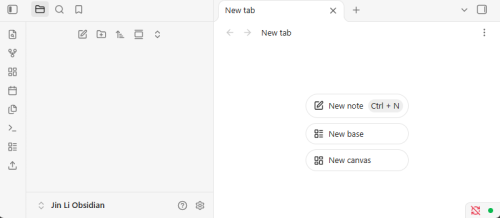
Click Create New Vault in the bottom right and enter the exact same vault name used on your other Obsidian clients (in my case, Jin Li Obsidian) so that Remotely Save maps to the same Nextcloud folder.
Once created, Obsidian loads directly inside the browser without any virtual-desktop chrome:
Configuring Remotely Save#
If you are migrating from an older container, double-check that all existing notes have already synced to Nextcloud and keep a temporary backup before removing the old container directory.
Inside the fresh vault, configuring sync follows the same steps as post one:
Open Settings from the bottom-left gear icon and enable Community Plugins.
Search for, install, and enable the latest Remotely Save plugin:
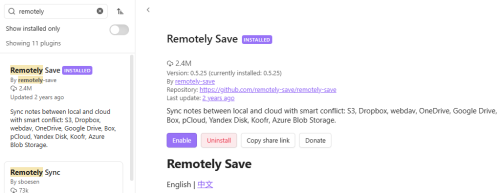
Import your settings string from another device, or enter your Nextcloud WebDAV details manually.
One detail that is easy to get wrong when entering the Nextcloud WebDAV URL manually: if your vault folder in Nextcloud is Jin Li Obsidian, set Server Address to your user’s WebDAV files root:
| |
Leave Remote Base Directory empty and do not append Jin Li Obsidian to the URL. Remotely Save automatically looks for a subfolder matching your vault name under the WebDAV root; appending the vault name creates a nested Jin Li Obsidian/Jin Li Obsidian directory instead. For the password, generate a dedicated Nextcloud App Password under Settings → Security → Devices & sessions rather than reusing your main login password.
Trigger a sync from the left sidebar icon to pull all notes from Nextcloud.
Even when Nextcloud and Ignis run on the same host, avoid directly bind-mounting Nextcloud’s internal data/<username>/files/ directory into Ignis for read-write access. Nextcloud manages file indexing (oc_filecache), locks, and version history through its own database and www-data ownership; writing files behind its back leads to stale indexes and sync conflicts. Going through WebDAV—whether via Remotely Save or a server-side tool like nextcloudcmd or rclone—keeps Nextcloud consistent.
Conclusion#
Moving from linuxserver/obsidian to Ignis makes browser-based Obsidian feel much cleaner. Without a virtual desktop layer in between, text rendering, Chinese display and input, copy/paste, and mobile access all work like a normal web app, with lower overhead and optional PWA standalone window support.
It still has clear boundaries: HTTPS and authentication must be provided by a reverse proxy, and plugins requiring native Node modules or child_process will not run in the browser. For an everyday note-taking workflow backed by Nextcloud and Remotely Save, however, Ignis is a noticeably cleaner replacement.