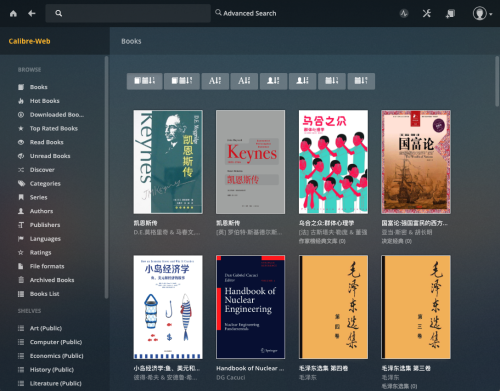
I’ve previously downloaded some eBooks, all of which are stored on the cloud drive. However, every time I want to read them on different devices, I need to download them first (even though they can be previewed on the cloud drive, I still find it better to download them and use a dedicated e-reader for a better experience). Moreover, with a growing number of eBooks, managing them on the cloud drive becomes quite chaotic. Recently, I came across the tool called “calibre-web,” which allows you to set up your own eBook library. I feel that the results are quite promising.
Debian-based systems can directly install docker using apt:
1
sudo apt-get install docker-ce
Install Docker Compose:
1
sudo apt-get install docker-compose
Docker Compose uses a file named docker-compose.yml to “synthesize” a docker container. docker-compose.yml is the formula for synthesizing this docker container.
For example, if you have a primary domain name jinli.cyou, you can create a second-level domain “book.jinli.cyou” for your personal cloud network disk. Then, bind the domain name and IP address on the Alibaba Cloud domain management platform.
Find the Access key for your domain management account. You can use the previous one or obtain a new one and export the Access key as system variables Ali_Key and Ali_Secret.
Use the following command to generate the certificate:
1
acme.sh --issue --dns dns_ali -d your.domain.com
Use the following command to copy the certificate to your Nextcloud directory. For example, I created a folder named cert in the Nextcloud installation directory to store the certificate files:
Since I installed nginx when building this website, I used nginx as the reverse proxy tool for Nextcloud (although Apache is mainly used for installation instructions on the Nextcloud website).
Create a new configuration file named calibre.conf as the reverse proxy configuration file for the cloud drive in the nginx configuration directory, and write the following content:
After installing calibre-web, we can enter the website through the browser.
The url is http://0.0.0.0:8080. If nginx is set up, we can also use the
domain name http://book.jinli.cyou.
The default account name and passcode for the administrator is admin and
admin123. We can do the initial settings after logging in.
First we need to download an empty database file metadata.db and move it to
the library folder of the installation directory of calibre-web, such as
/media/calibre-web/library.
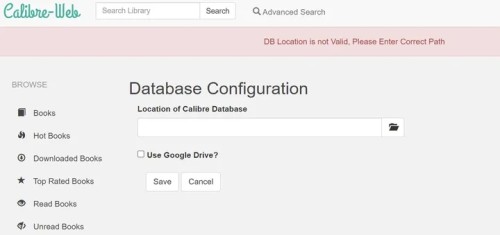
Then choose /books as the database path in calibre-web. Note that the directory /books in docker is actually the directory /media/calibre-web/library on the server. Here calibre-web may still show error message because of the file access permission problem:.
To change the read/write permission, we need to enter the docker environment. The commands are